
Why the Biggest Book Isn't the One You Pack First
Published
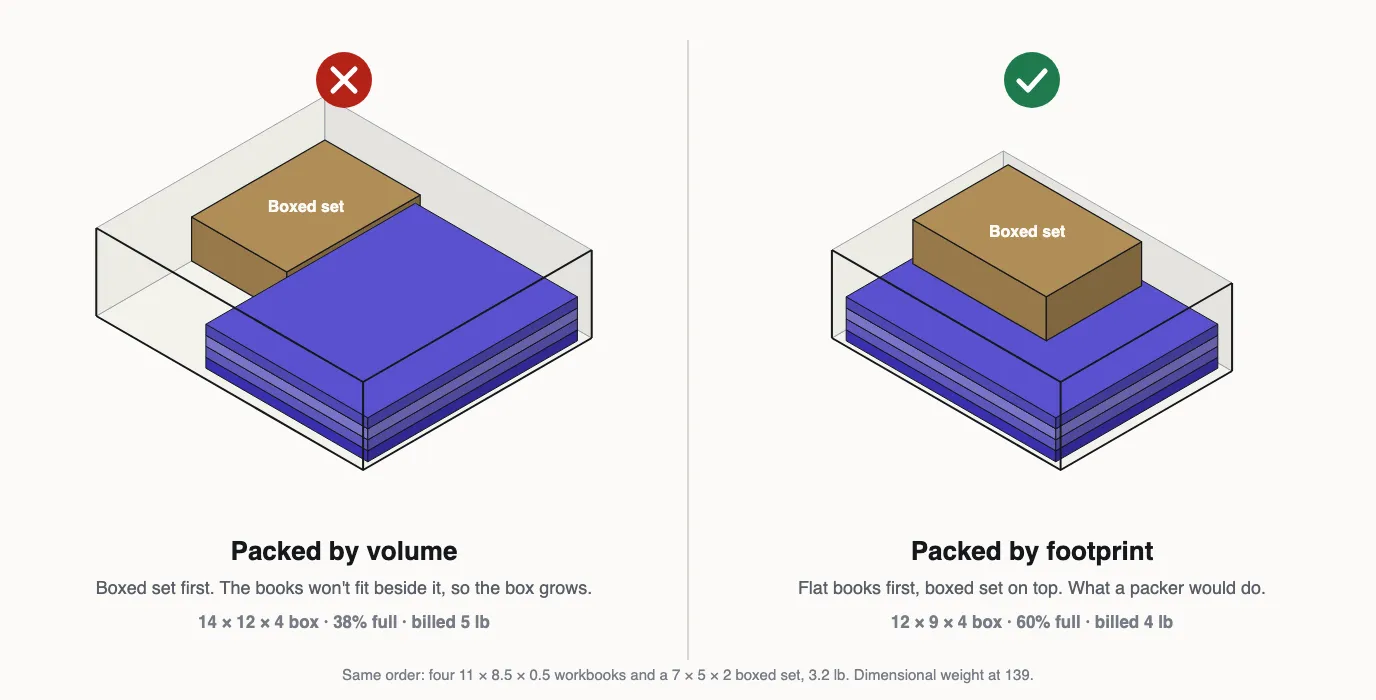
Short answer: Packing software usually places the largest item first, and “largest” usually means volume. Flat products like books break that shortcut. A wide, thin workbook has less volume than a thick little boxed set, but it has to go in first. If the boxed set goes first, it takes a corner of the floor, the flat books no longer fit beside it, and the software steps up to a bigger box. Sorting by footprint, the size of an item’s largest flat side, puts the books down first and fits the order in the box your packers would use. I build String, which automates packing in ShipStation, and this is a mistake my own logic made.
Before String touches a new customer’s live orders, I run their past orders through it and compare its boxes with the ones their team actually used.
With one customer that sells books and workbooks, the simulation kept choosing a box one size bigger than their packers had been using for the same orders. Their packers were right. My logic was wrong.
Why packing software starts with the biggest item
Finding the best way to pack a box is a famously hard problem. No software checks every possible arrangement for every order. Instead, it takes shortcuts.
The most common one is to put the biggest item in first and work down to the smallest. Big items are the hardest to place, so you place them while there’s still room, and the small ones fill in the gaps.
That leaves the question of what “biggest” means. The easy answer is volume: length × width × height. For most products, that works fine. For books, it doesn’t.
What goes wrong with books
Here’s a simplified order that shows what was happening:
| Item | Size (inches) | Volume | Footprint |
|---|---|---|---|
| 4 large-format workbooks | 11 × 8.5 × 0.5 each | 47 cu in each | 93.5 sq in each |
| 1 small boxed set | 7 × 5 × 2 | 70 cu in | 35 sq in |
By volume, the boxed set is the biggest thing in the order, so it goes in first. Try that in a 12 × 9 × 4 box:
- The boxed set takes a corner of the floor.
- The space left beside it is 5 inches wide on one side and 4 inches on the other. An 8.5 × 11 workbook doesn’t fit in either.
- The space above the boxed set is only 7 × 5. A workbook can’t lie on it, because half the book would be over empty air.
So the order “doesn’t fit,” and the software moves up a size. In a 14 × 12 × 4, there’s finally a 9-inch strip beside the boxed set where the workbooks can stack. The order packs, with a lot of empty space around it.
Now put the workbooks in first. They stack flat into a 2-inch layer that covers the floor of the 12 × 9 × 4. The boxed set sits on top. The whole order is exactly 4 inches tall, and the box closes. That’s what anyone at a pack station would do without thinking about it.
What the bigger box costs
Carriers bill on the greater of actual weight and dimensional weight. This order weighs 3.2 lb. At a divisor of 139:
| 12 × 9 × 4 | 14 × 12 × 4 | |
|---|---|---|
| How full the box is | 60% | 38% |
| Dimensional weight | 3.1 → 4 lb | 4.8 → 5 lb |
| Billed weight | 4 lb | 5 lb |
That’s an extra billed pound, plus more void fill and a bigger box to buy, on every order like this. The only reason is which item went in first.
It isn’t always money. On heavier book orders, the actual weight already sets the price and the bigger box bills the same. You still pay for the void fill, the books still slide around, and your packers learn not to trust the recommendation. Once they stop trusting it, they stop using it.
What I changed
I changed the order so items with the largest footprint go in first. The widest, flattest items now form the bottom layers, and thick, compact items go on top or fill the gaps. That matches what packers already do with books: lay the big flat ones down, then stack.
This doesn’t make the shortcut perfect. Every packing shortcut has products it gets wrong, which is part of why I aim for about 90% full rather than a perfect fit. But for flat products, putting footprint first fixed the boxes the simulation was getting wrong.
Does this affect you?
Probably not, if:
- your products are all roughly the same thickness, or
- you mostly ship one book per mailer.
It’s worth checking if you ship a mix of flat and chunky items in one box: books with boxed sets, prints with frames, workbooks with kits, puzzles with game boxes.
Here’s a quick way to tell. Pull a week of orders that mix flat and thick items. Compare the box your software recommended with the one your team actually used. If the team keeps going a size smaller, and it’s the flat products every time, the software is probably sorting by volume.
If your products are mostly simple, rigid boxes, ShipStation’s Recommend Package rule may be all you need, so try that first.
For operations past what rules can do
Shipping books or other flat products?
String's Pro Automation packs flat items the way your packers do, so the box it picks is the one they'd grab.